

Free EMC D-PDD-DY-23 Exam 2025 Practice Materials Collection
D-PDD-DY-23 Exam Info and Free Practice Test All-in-One Exam Guide Sep-2025
NEW QUESTION # 97
Which protocol is used for communications between a PowerProtect DD appliance and cloud tier to Dell EMC ECS?
- A. HTTPS
- B. SSH
- C. SSL
- D. FTP
Answer: A
NEW QUESTION # 98
During a normal workday an administrator notices poor performance (<1MB/s) in combination with poor global compression rate (<1x).
What metrics should be monitored to find the issue?
- A. Stream count, disk reconstruction, and replication
- B. NVRAM battery level, link utilization, and disk reconstruction
- C. Cleaning, NVRAM battery level, and link utilization
- D. Stream count, CPU utilization, and replication
Answer: D
NEW QUESTION # 99
What are the login credentials for the default iDRAC user on a new PowerProtect DD appliance?
- A. root/system serial number
- B. sysadmin/changeme
- C. sysadmin/system serial number
- D. root/calvin
Answer: A
NEW QUESTION # 100
What is one advantage of using PowerProtect DD instead of backing up to other disk-based file systems?
- A. Only deduplicated data is sent across the network.
- B. Data can be restored to any client operating system.
- C. Only deduplicated blocks of data are needed for full recovery.
- D. Data is stored locally on the client for fast restore.
Answer: A
NEW QUESTION # 101
Which steps make up the PowerProtect DD sanitization process?
- A. Merge, Analysis, Enumeration. Copy, and Zero
- B. Indexing. Merge, Enumeration, and Copy
- C. Analysis, Zero. Merge, and Cleaning
- D. Decryption, Merge. Unpacking, and Cleaning
Answer: C
Explanation:
The sanitization process in a PowerProtect DD system involves securely erasing data to prevent any recovery of the deleted information. The process typically follows these steps:
Analysis: Identifies the data that needs to be sanitized.
Zero: Overwrites the data with zeroes to ensure that it cannot be recovered.
Merge: Combines any leftover fragments to ensure consistency.
Cleaning: Finalizes the process by clearing residual data, making sure the storage space is ready for reuse.
This process ensures secure data deletion, maintaining data privacy and compliance with data security standards.
NEW QUESTION # 102
Which are supported compression algorithms in DDOS?
- A. dsp, gz, and lz
- B. lz, gz, and gzfast
- C. rle, lzw, and lz
- D. bmp, lz, and gz
Answer: B
NEW QUESTION # 103
Which product provides air-gap and minimizes the impact of a cyber-attack using a PowerProtect DD system?
- A. NetBackup
- B. CyberSense
- C. PowerProtect Cyber Recovery
- D. PowerProtect Data Manager
Answer: C
Explanation:
PowerProtect Cyber Recovery is designed to protect critical data from cyber threats by creating a secure, isolated environment (an air-gap) where backups can be stored. This air-gapped solution minimizes the impact of a cyber-attack by ensuring that critical data is inaccessible to attackers, even if they breach the main network. In the event of an attack, clean data from the secure vault can be used to restore the system to its pre- attack state.
NEW QUESTION # 104
Task 6
A backup administrator finished installing a PowerProtect DD3300. After the installation, they notice disk 1.5 is offline after running the disk fail command in the DDOS CLI.
Using the simulator, flash an LED on the hard drive with the issue and return it to operation.
When you have finished, continue to the next question.
Answer:
Explanation:
See the solution in the explanation below.
Explanation:
To flash an LED on a hard drive and bring a disk back online using the DD System Manager or DDOS CLI, follow these general steps:
Step 1: Identify the Disk
* In DD System Manager:
* Go to the Hardware section in the sidebar.
* Locate the list of disks, and find Disk 1.5 (the offline disk).
* In DDOS CLI (if using CLI):
* Use the command to list disks and confirm the status of Disk 1.5.
* Command example: disk show state or disk show summary.
Step 2: Flash the LED on the Disk
* In DD System Manager:
* In the Hardware section, select Disk 1.5.
* Look for an option like Flash LED or Locate Drive to help identify the physical disk.
* Activate the LED flash to identify the disk physically.
* In DDOS CLI:
* Use the command: disk locate 1.5 to flash the LED for Disk 1.5.
Step 3: Bring the Disk Back Online
* In DD System Manager:
* After identifying the disk, check for options to Bring Online or Reactivate Disk 1.5.
* Select the option to return the disk to operation.
* In DDOS CLI:
* Use the command: disk unfail 1.5 to bring the disk back online.
Step 4: Verify the Disk Status
* Confirm in DD System Manager or by using the disk show state command in CLI that Disk 1.5 is now online and functioning.
After completing these steps, the LED should flash to help locate the disk physically, and then Disk 1.5 will be returned to an operational state. Let me know if you need further guidance!
A screenshot of a computer Description automatically generated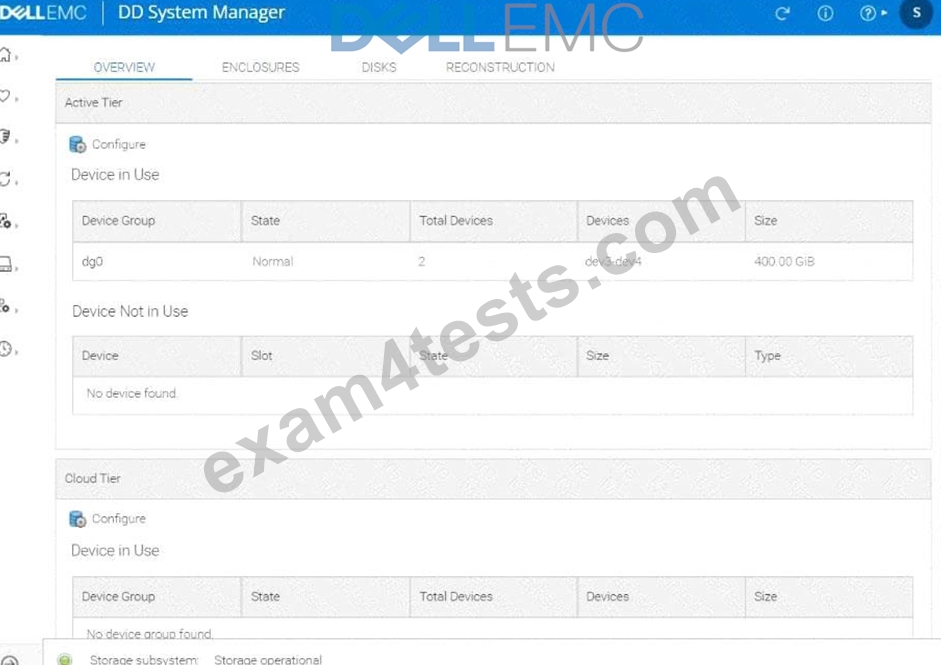
NEW QUESTION # 105
What is a use case of BoostFS
- A. To implement DD Boost over Fibre Channel
- B. To enable snapshot on DD Boost data
- C. To increase DD Boost throughput
- D. To protect applications that do not support DD Boost
Answer: D
NEW QUESTION # 106
A PowerProtect DD administrator uses the support bundle list command.
What is expected output?
- A. The contents of latest support bundle
- B. The contents of oldest support bundle
- C. A list of all support bundle files
- D. A list of the latest support bundle file
Answer: C
Explanation:
This command shows a list of all the support bundle files that have been created, allowing administrators to view and manage them.
NEW QUESTION # 107
Put the steps in correct order to create a mount on a backup server and copy a test file to a PowerProtect DD appliance over NFS.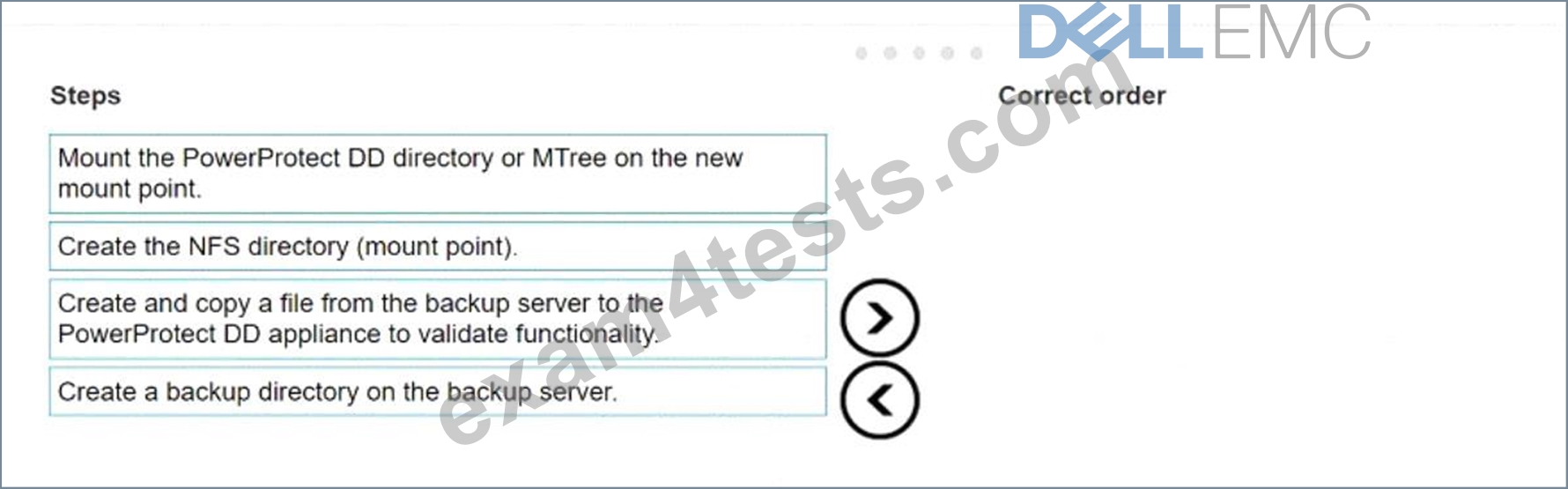
Answer:
Explanation: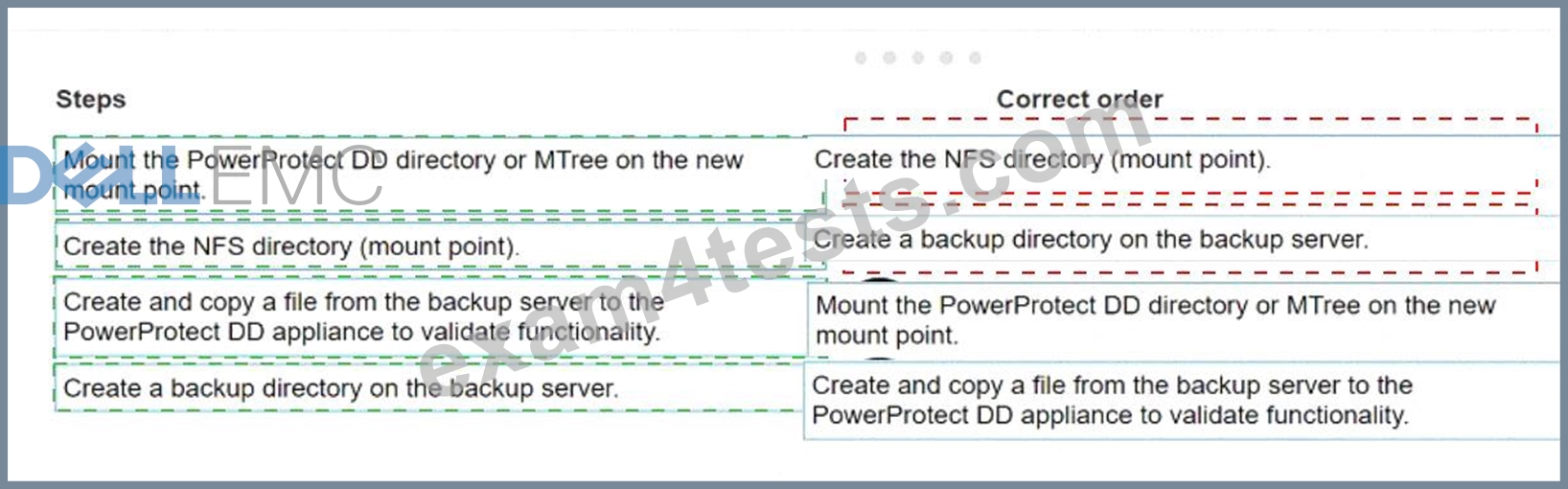
Explanation:
The correct order of steps to create a mount on a backup server and copy a test file to a PowerProtect DD appliance over NFS is as follows:
* Create the NFS directory (mount point).
* Create a backup directory on the backup server.
* Mount the PowerProtect DD directory or MTree on the new mount point.
* Create and copy a file from the backup server to the PowerProtect DD appliance to validate functionality.
* Create the NFS Directory (Mount Point): The first step is to set up the NFS directory or mount point on the backup server. This directory will serve as the destination where the PowerProtect DD appliance will be mounted.
* Create a Backup Directory on the Backup Server: Once the mount point is ready, create a dedicated directory on the backup server to store backups. This directory structure helps organize data and ensures backups are written to the correct location.
* Mount the PowerProtect DD Directory or MTree on the New Mount Point: Use the NFS protocol to mount the specified PowerProtect DD directory (or MTree) onto the created mount point. This step establishes the connection between the backup server and the PowerProtect DD appliance.
* Create and Copy a File from the Backup Server to the PowerProtect DD Appliance to Validate Functionality: Finally, to confirm that the mount is correctly configured and functional, create a test file on the backup server and copy it to the PowerProtect DD appliance. This test ensures that the server can write data to the appliance over the NFS mount.
This ordered sequence ensures a successful setup of the mount and verifies the connectivity and functionality of the NFS configuration on the PowerProtect DD system.
NEW QUESTION # 108
A backup administrator is tasked with monitoring PowerProtect DD capacity metrics. The administrator is backing up 2 TB of data daily with a reduction rate at 5x. After data reduction, subsequent full backups compress down to 100 GB.
The initial backup requires 400 GB with a 10 percent increase in the data each day. Each incremental backup is 200 GB. After data reduction, each incremental backup is 20 GB.
What is the weekly burn rate (GB) after four daily incremental backups and one weekly backup?
- A. 0
- B. 1
- C. 2
- D. 3
Answer: B
NEW QUESTION # 109
An administrator recognizes poor network performance when using CIFS shares from a PowerProtect DD system. The network link utilization is under 100%. What is the most likely cause of this issue?
- A. TCP window size too large
- B. TCP window size too small
- C. TCP timeout too small
- D. TCP timeout too large
Answer: B
Explanation:
Explanation: A small TCP window size can restrict data throughput, leading to suboptimal performance in CIFS-based file transfers. Adjusting the TCP window size can help maximize network bandwidth utilization and improve transfer speeds.
NEW QUESTION # 110
How many hot spare drives does the DS60 have?
- A. The system uses distributed sparring instead of hot spares
- B. 2, 4, 6, or 8
- C. 1, 2, 3, or 4
- D. 3, 6, 9, or 12
Answer: C
NEW QUESTION # 111
A storage administrator finished the zoning between the PowerProtect DD and the NetWorker backup server.
How can they verify that the zoning was completed properly and the server HBA are visible?
- A. scsitarget show initiator
- B. scsitarget initiator list
- C. scsitarget show initiator list
- D. scsitarget initiator show list
Answer: C
Explanation:
The command scsitarget show initiator list is used to display a list of initiators (such as the backup server HBAs) that are connected to the PowerProtect DD system. This allows the storage administrator to confirm that the zoning was successfully configured and that the HBAs from the NetWorker backup server are visible and recognized by the system.
NEW QUESTION # 112
What command is used to make a storage unit?
- A. ddboost storage-unit create <storage_unit>
- B. boostfs mount -storage unit
- C. storage add tier active
- D. filesys create
Answer: A
Explanation:
Explanation: The ddboost storage-unit create <storage_unit> command is used to create a storage unit specifically for DD Boost-enabled backups, facilitating direct backup operations with PowerProtect DD.
NEW QUESTION # 113
Which of the following protocols are supported by PowerProtect DD for data movement to a cloud provider?
- A. CIFS and NFS
- B. HTTP and HTTPS
- C. VTL and DD Boost
- D. FTP and FTPS
Answer: B
NEW QUESTION # 114
What is the correct sequence to perform Cloud Tier migration?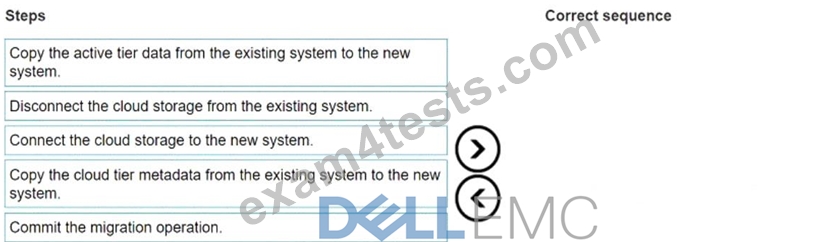
Answer:
Explanation: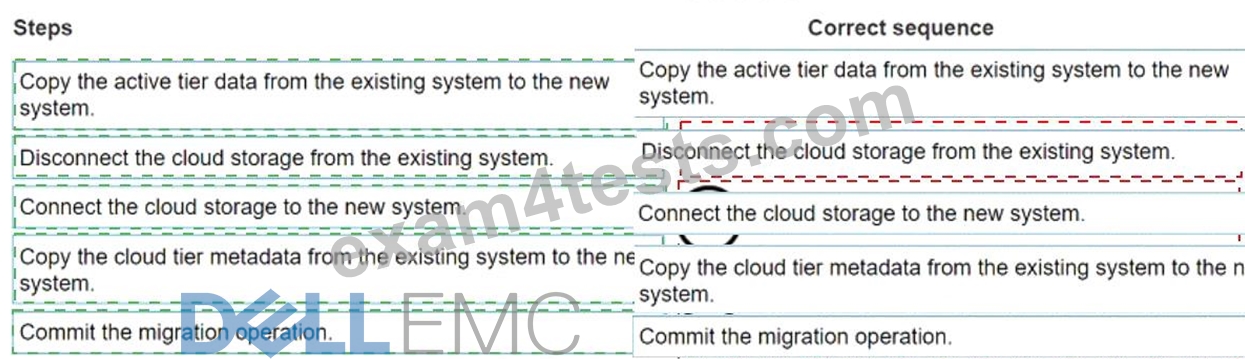
Explanation:
The correct sequence to perform Cloud Tier migration is as follows:
* Copy the active tier data from the existing system to the new system.
* Disconnect the cloud storage from the existing system.
* Connect the cloud storage to the new system.
* Copy the cloud tier metadata from the existing system to the new system.
* Commit the migration operation.
* Copy Active Tier Data: Start by transferring active tier data from the current system to the new PowerProtect DD system. This step ensures that primary data is accessible on the new appliance.
* Disconnect Cloud Storage: Once the active tier data is copied, disconnect the cloud storage from the original system to prepare it for reconnection.
* Connect Cloud Storage to New System: Attach the cloud storage to the new system. This step transitions cloud storage access from the old to the new appliance, preparing it for continued operations.
* Copy Cloud Tier Metadata: Metadata associated with the cloud tier is copied to the new system, ensuring continuity of data access and management in the cloud tier.
* Commit Migration Operation: Finally, complete the migration process by committing the changes, solidifying the new system as the primary appliance for both active and cloud tier operations.
This ordered approach ensures a structured and reliable migration process, maintaining data integrity and continuity across PowerProtect DD systems.
NEW QUESTION # 115
Which systems support the FS25 enclosure?
- A. DD9800, DD9900, and DD6900 (HA Only)
- B. DD3300, DD6800, and DD9900
- C. DD9900, DD6900, and DD9400
- D. DD6900 (HA Only), DD9400 (HA Only), and DD9900 (HA Only)
Answer: C
Explanation:
Explanation: The FS25 enclosure is compatible with DD9900, DD6900, and DD9400, providing additional storage capacity and performance capabilities tailored for high-demand PowerProtect DD deployments.
NEW QUESTION # 116
When using the DD VTL Tape Out to Cloud feature, which status will a tape show once it is in the cloud tier vault?
- A. Vaulted
- B. Offsite
- C. Offline
- D. Archived
Answer: B
NEW QUESTION # 117
A PowerProtect DD appliance with two expansion shelves is being installed in a customer-provided rack.
When cabling the controller to the shelves, what is connected to the host port on the last shelf in the chain?
- A. Host port of the downstream shelf
- B. Host port of the controller
- C. Expansion port of the upstream shelf
- D. Expansion port of the controller
Answer: C
NEW QUESTION # 118
What is the maximum number of ES40 SAS shelves that can be added to a PowerProtect DD system with an existing DS60 shelf?
- A. 0
- B. 1
- C. 2
- D. 3
Answer: D
Explanation:
Explanation: When a DS60 shelf is already part of the configuration, a maximum of 5 ES40 SAS shelves can be added to maintain balance and prevent overloading the system's data handling capabilities. This limit ensures optimal performance and reliability.
NEW QUESTION # 119
A customer is attempting to configure VTL with 68 libraries, 800 slots, 524 drives, and 100 CAPs each but is unable to complete the configuration.
What is the cause of this issue?
- A. Reached drives limit
- B. Reached libraries limit
- C. Reach CAPs limit
- D. Reached slots limit
Answer: B
Explanation:
PowerProtect DD appliances have specific limits on the number of libraries, slots, drives, and CAPs that can be configured. In this case, reaching the limit of 68 libraries likely exceeds the maximum allowed, preventing the configuration from being completed. Each component has its own limits, but in this scenario, the number of libraries is the bottleneck that prevents successful configuration.
NEW QUESTION # 120
What is the Backup Data packet flow from the NetWorker Client to the PowerProtect DD appliance?
- A. Through the Media Server and then to PowerProtect DD
- B. Through the Backup Server and then to PowerProtect DD
- C. Through the Storage Node and then to PowerProtect DD
- D. Direct from the SAN Media Server to PowerProtect DD
Answer: D
Explanation:
In a typical NetWorker backup architecture, the data flow starts at the NetWorker Client, which sends backup data to the Media Server. The Media Server is responsible for processing the data and then forwarding it to the PowerProtect DD appliance for storage. This flow allows for efficient data handling, including deduplication and compression before the data reaches the PowerProtect DD system.
NEW QUESTION # 121
The finance department requires PDFs older than 90 days to be archived through Cloud Tier into Azure Blob Storage. They want any PDFs older than 180 days archived into AWS S3.
Which data movement policy is used to archive files into Azure Blob Storage?
- A. Recall
- B. Age-range
- C. Age-based
- D. App-driven
Answer: B
NEW QUESTION # 122
......
EMC D-PDD-DY-23 Exam Syllabus Topics:
| Topic | Details |
|---|---|
| Topic 1 |
|
| Topic 2 |
|
| Topic 3 |
|
| Topic 4 |
|
| Topic 5 |
|
Pass EMC D-PDD-DY-23 Actual Free Exam Q&As Updated Dump: https://braindumps.exam4tests.com/D-PDD-DY-23-pdf-braindumps.html